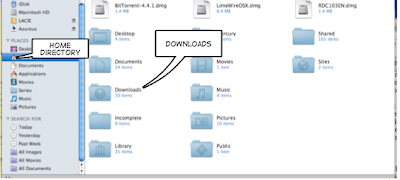
As you probably have guessed, I'm quite un-tech savvy. I know enough to get by, but once I get into a little problem, I get stuck for ages.
Well, today I accidentally deleted my Downloads stack on Dock and was gutted! I love this new feature on Leopard and it's so darn helpful, especially considering I download tons of torrent files. It's so handy to just drag it to Azureus.
Being lazy to figure out how to get it back on my own, I decided to google the answer, but strangely enough, there were none. I'm guessing it's because it's the most basic thing ever, so everyone should be able to figure it out on their own. Well, I'm not THAT smart, it took me awhile so when I finally figured it out, I thought, I should write a post about this so next time someone searches for this question on google, you'd be able to find out how to do it. Yay to IT illiteracy and the internet.
1. Open Finder.
2. Go to your home directory, (ie. the icon with a little house)
3. There, find your Downloads folder
4. Drag your Downloads folder to Dock and voila, you get a Stack!
One thing I did find was that you have tweak it a little to get it back to how it was. So, Ctrl-click on the Downloads folder in Dock, and change the 'View Content As' and 'Sort By' to how you like it.
Hope this was helpful. :)